Shells
| Documentation | /NGOS | /Signals | /Shells | /Cmds | /Ctrl | /HALs | /Conf | /Params | /Behaviors | /Receiver | /GPS | Next Chapter |
The NG Console Shells
The NG supports console shells on most (soon even all) processors. This allows developers easy access to debug commands and debug output and it allows users very easy and fine grained control over their QC system. Currently the NG has 3 processors and consequently it has 3 different consoles. Depending on which plug you use you reach a different console.
The FC currently provides access to the LPC main processor using USB (on the LPC2148) and UART0 and UART1 ports, called X-UART0/1 on the board. The FC board also contains the RC-Controller which provides two more UARTs called X-DSL0/1. The RC-Controller provides shell and DSL support on both of them.
Console on FC X-UART0 and X-UART1
The NG flight control can be controlled by shell using the two serial ports called X-UART0 and X-UART1 on the FC board.
/!\ Be sure to use a TTL/RS-232 converter when connecting a PC’s RS232 port to one of the NG’s UARTs! The NG’s UARTs use 3.3V signaling and are 5V tolerant only!
The default parameters for RS232 communication on both X-UART0 and X-UART1 are:
||<tablestyle=“width: 10%;” style=“border: 0;">Baudrate:||<style=“border: 0;">115200|| ||<style=“border: 0;">Databits:||<style=“border: 0;">8|| ||<style=“border: 0;">Parity:||<style=“border: 0;">None|| ||<style=“border: 0;">Stopbits:||<style=“border: 0;">1||
The baudrate of both UART ports can be configured using the FC console shell by changing the global variables HW.uart0.baud and HW.uart1.baud. The command set HW.uart0.baud 9600 sets 9600 Baud on X-UART0 for example.
/!\ A RS232 port uses 12V signaling and will destroy your NG’s UART without the use of a TTL/RS-232 converter!
The Mikrokopter’s SerCon has proven to be a reliable TTL/RS-232 converter.
Console on FC USB
The NG flight control can also be controlled by shell using the USB port on the LPC2148.
Linux
Under Linux the NG FC will appear as /dev/ttyACM0 and can be used with a terminal program like minicom.
Windows
Under Windows you will need to install the usbserial driver. We supply a usbserial.sys and usbserial.inf. The driver has to be installed on the Windows system prior to attaching the NG using an USB cable.
Console on RC-Controller X-DSL0 and X-DSL1
The RC-Controller on the NG flight control can be controlled by shell using the two serial ports called X-DSL0 and X-DSL1 on the FC board.
{i} Be sure to use a TTL/RS-232 converter when connecting a PC’s RS232 port to one of the NG’s UARTs! The NG’s RC-Controller UARTs use 5V signaling and are 5V tolerant only!
The default parameters for RS232 communication on both X-DSL0 and X-DSL1 are:
||<tablestyle=“width: 10%;” style=“border: 0;">Baudrate:||<style=“border: 0;">38400|| ||<style=“border: 0;">Databits:||<style=“border: 0;">8|| ||<style=“border: 0;">Parity:||<style=“border: 0;">None|| ||<style=“border: 0;">Stopbits:||<style=“border: 0;">1||
The default baudrate is set to 38400 baud so that ACT DSL receivers can be attached directly without reconfiguration.
Console on SB-Controller X-GPS (X1)
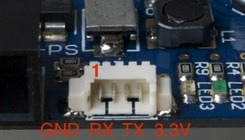
The console shell on the SB board shares a connector with the GPS connector: X1
{i} Be sure to use a 3.3V TTL/RS-232 converter when connecting a PC’s RS232 port to one of the NG’s UARTs!
/!\ The NG’s SB-Controller UARTs use 3.3V signaling and are 3.3V tolerant only!
The default parameters for RS232 communication on X1 are: ||<tablestyle=“width: 10%;” style=“border: 0;">Baudrate:||<style=“border: 0;">115200|| ||<style=“border: 0;">Databits:||<style=“border: 0;">8|| ||<style=“border: 0;">Parity:||<style=“border: 0;">None|| ||<style=“border: 0;">Stopbits:||<style=“border: 0;">1||