NGCamCtrl
The NG Camera Controller
Features
- Atmel ATmega644P 20mhz 8bit MCU (RC/Servo/Comm controller)
- Support for 4 servo channels (RC controller)
- 2 Optocoupler outputs
- 2 onboard UARTs (5V) for ACT DSL receivers, consoles and GPS
Connectors
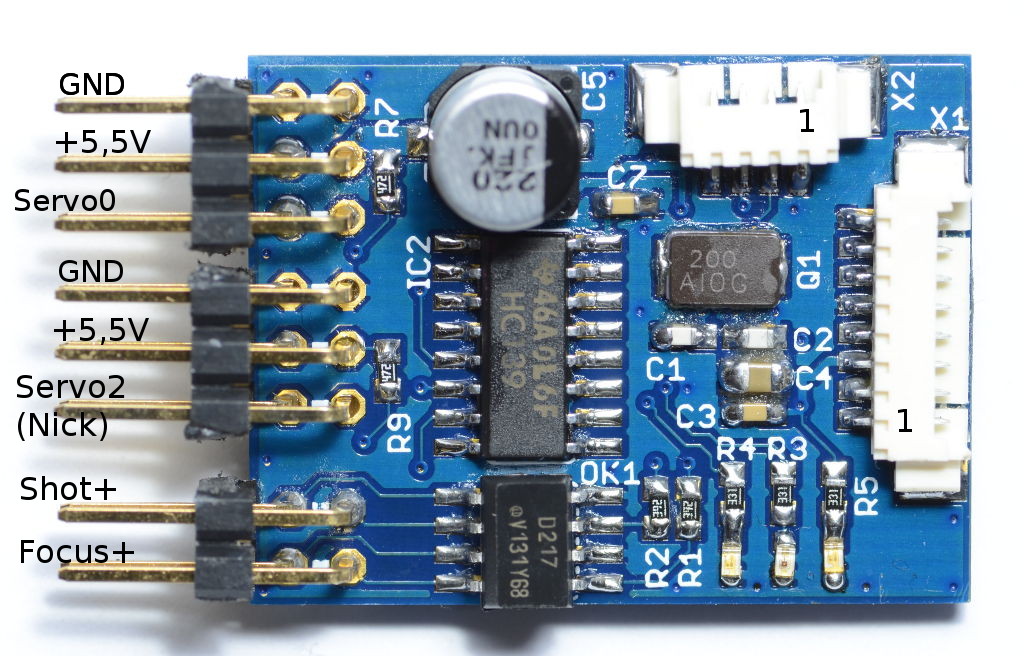
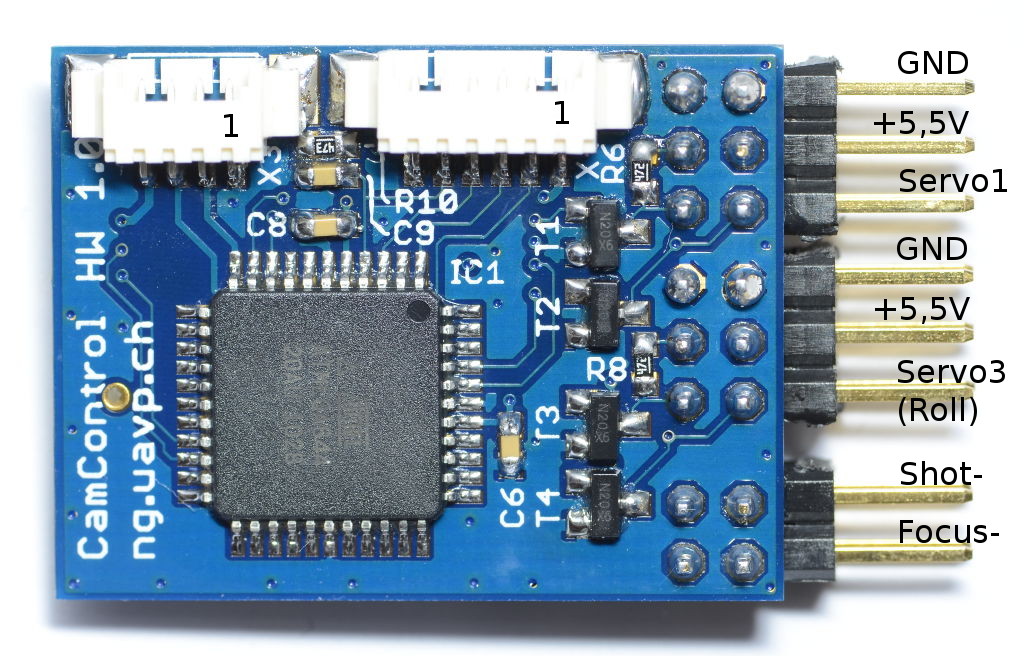
I2C (X1)
| Pin 1 | +5,5V |
| Pin 2 | +5,5V |
| Pin 3 | +5V |
| Pin 4 | +3,3V |
| Pin 5 | GND |
| Pin 6 | SCL |
| Pin 7 | SDA |
| Pin 8 | GND |
UART 1 (X2)
| Pin 1 | GND |
| Pin 2 | RX |
| Pin 3 | TX |
| Pin 4 | +5V |
UART 2 (X3)
| Pin 1 | GND |
| Pin 2 | RX |
| Pin 3 | TX |
| Pin 4 | +5V |
SPI (X4)
| Pin 1 | +5V |
| Pin 2 | MISO |
| Pin 3 | MOSI |
| Pin 4 | SCK |
| Pin 5 | RESETn |
| Pin 6 | GND |
Compile
Top compile the source code type the following:
cd ngos-rcc
./configure --enable-cam-ctrl
make
Flash with avrdude
Connect ISP Programmer to SPI connector X4
avrdude -p m644p -c avrisp2 -V -P usb -U lfuse:w:0xff:m -U hfuse:w:0xd0:m -U efuse:w:0xfd:m -U rc-ctrl.hexConnection to FC
Connect the cam controller to the I2C general purpose bus (X8) of the FC.
# show devices
...
0x16  I2C0    Atmel 644P RC/Comm Controller
The Cam Controller also has its own terminal. Connect a terminal to one of the cam controller UARTs. The default baud rate is 38400. See also hints below!
Servo Control
Nick/Roll compensation
In the default configuration of the Cam Controller Servo2 is configured for nick compensation, Servo3 for roll compensation. Nick/Roll compensation is activated by default if a cam controller is detected by the FC.
Use the cam controller terminal to setup the servos.
Issue a {{{ conf storeto save the settings in flash.
To be able to change nick and roll angles of your attitude compensated cam-holder on Servo2 + Servo3 of your CAMC or RCC you can define two channels to override the nick/roll angles.
behavior add when.rc.pot.changed(4) rcctrl.set.nick.corr.pot(4)
behavior add when.rc.pot.changed(5) rcctrl.set.roll.corr.pot(5)
These behaviors allow you to change nick and roll angles of your cam-holder on Servo2 + Servo3 using pot4 and pot5 which should be preferably potentiometers.
Direct Servo control
if you want to use a brushless gimbal and want to control nick axis, then attitude control should be turned off and nick should be control directly by a potentiometer. On the FC you can use behaviors like this
behavior add when.rc.pot.changed(4) rcctrl.set.servo.pot(3,1)This means pot4 controls Cam Controller Servo2 (1 less then on FC counting. On the FC servo counting starts with 1).
Issue a conf store to save the settings in flash.
Connect to Cam Controller described below.
Issue a command to disable Nick/Roll compensation permanently.
set Servo.opmode 1Issue a conf store to save the settings in flash.
Connecting NGCamCTRL to a PC
If you would like to know what’s parameters are set to which value, simply connect NGCamCTRL to your PC and NGCamCTRL using X2 or X3 to open a terminal connection, e.g. by using PuTTY.
Proven connection settings are
| Baud | 38400 |
| Data bits | 8 |
| Stop Bits | 1 |
| Parity | None |
| Flow control | None |
ATTENTION: If you’re using NGusb for this connection, ensure JP4 is open! JP4 being set to 3,3V or 5V will avoid any connectivity an might result in FC reboots permanentely even without the power button been pushed!
Once a connection is established, type “help” for available commands:
# help

List of commands:

  help                  print help
  ?                     print help
  show version          show version
  show license          show license
  show authors          show authors
  show tasks            show process table
  show devices          show detected and activated devices
  show globals          show global configuration
  show dsl              [status|channels] show RC DSL statistics or channels
  show servo            show servo settings
  loop adc              show values of adc channels AD0.[1234]
  loop dsl              [uart0|uart1] show received RC DSL signals
  loop mpx              [uart0|uart1] show received RC MPX signals
  loop attitude         show reveived attitude data from FC
  dump globals          dump all global variables
  edit servo            [0..4] edit limits and zero position of servos
  edit                  change a key's value interactivly
  set                   [var] [val] set a variable [var] to a value [val]
  conf store            store configuration in eeprom
  debug                 a debug command, could be anything
edit servo
Use this command to edit limits, neutal position, speed and direction of servos.
Use set commands like set Servo2.speed 4 alternatively.
Issue a conf store to save the settings in flash.